Category: Remote Management Controller#
The Remote Management Controller category documents the out-of-band management interfaces of a server — i.e. components such as Dell iDRAC, HPE iLO, Supermicro BMC, or generic IPMI interfaces. It is a multi-value category, since a server can theoretically have multiple management controllers (e.g. an iDRAC and an additional BMC).
Why out-of-band management should be documented
Remote management controllers are the last lifeline when a server is no longer reachable via the regular network. Anyone who has ever stood in a data center at three in the morning because the iDRAC IP was documented nowhere knows: This category saves hours in an emergency. Enter at least the primary access URL and the assigned management object.
Why This Category Matters#
Physical servers in data centers are almost never administered via keyboard and monitor — the remote management controller handles that. It enables console access, restart, BIOS configuration, and hardware monitoring, even when the operating system is no longer responding. Without documented management access points, the administrator depends on physical access in case of a failure — which can take hours or days at distributed locations or colocation data centers.
Usage#
Typical use cases:
- Lights-out administration: In data centers without permanent on-site presence, the remote management controller is the primary access path for hardware operations. The category provides the URL through which the administrator reaches the web interface of the controller.
- Incident Response: Server no longer responding? The documented management URL enables immediate out-of-band access — without having to search through password safes or wiki pages first. In combination with the category Access, this provides a complete picture of all access paths.
- Hardware monitoring: Modern management controllers report temperatures, fan speeds, power supply status, and hard drive health. Documentation of the controller in the CMDB ensures that monitoring systems know which controller to query.
- Firmware management: Management controllers require regular firmware updates. Using reports, you can evaluate which servers have which controller type — and thus which firmware versions need to be rolled out.
Fields#
Primary access URL#
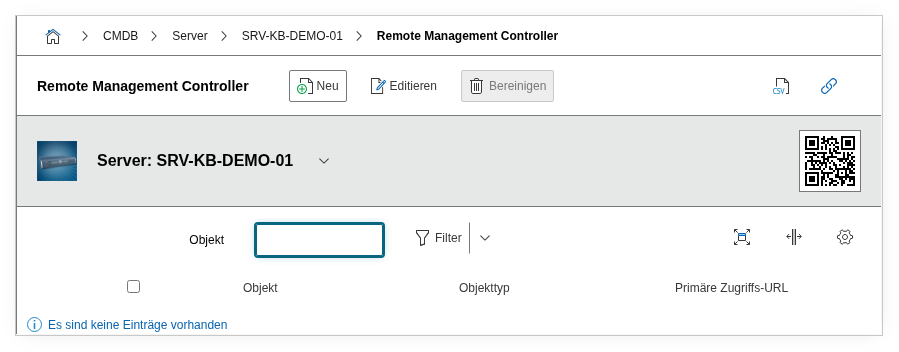
The URL through which the web interface of the management controller is reachable — e.g. https://idrac-srv01.mgmt.example.com or https://192.168.10.51. This field is the central starting point for administrators who need to access the controller. The value is imported from the Access category of the linked management object.
Access URL via the linked object
The primary URL is not edited directly in this field, but rather imported from the assigned remote management object (field "Remote Management Controller"). Maintain the URL in the Access category of the management object — it then appears here automatically.
Remote Management Controller#
An object browser field that refers to the management controller object. In practice, a separate object of the type "Remote Management Controller" is often created, which carries the IP address (via the category Host address) and the access URL (via Access) of the controller. The link here establishes the relationship between the physical server and its management controller.
Description#
Free text for additional information: controller type (iDRAC 9, iLO 5, BMC), firmware version, notes on network connectivity (dedicated MGMT VLAN vs. shared NIC), default credentials reference, or special configuration notes.
Technical Reference#
| Property | Value |
|---|---|
| Category Constant | C__CATG__RM_CONTROLLER |
| Type | Global category |
| Multi-Value | Yes |
| Assigned to | Server, Blade Server, Blade Chassis etc. |
Fields (API Reference)#
| Field | API Key | Type |
|---|---|---|
| Primary access URL | remote_url | Text (read-only, from linked object) |
| Remote Management Controller | connected_object | Object browser (connection object) |
| Description | description | Text field (multi-line) |
API Examples#
Create Entry#
1 2 3 4 5 6 7 8 9 10 11 12 13 14 | |
Read Entries#
1 2 3 4 5 6 7 8 9 10 | |
Update Entry#
1 2 3 4 5 6 7 8 9 10 11 12 13 14 | |