Category: IP List#
The IP List displays all IP addresses assigned within a Layer 3 network. It is a multi-value category and belongs to objects of the type Layer 3 Network and Supernet. Each entry represents an IP address that was assigned to a device via the Host address category.
The crucial difference from other categories: The IP List is primarily a reverse view. The data is not maintained directly in this category, but rather is created automatically when an IP address is added to an end device in the Host address category and assigned to this network object. The IP List aggregates these assignments and displays them bundled on the network object -- a kind of live overview of the entire subnet.
Reading, not writing
The IP List is primarily a read view. The actual data maintenance takes place in the Host address category on the individual devices. If an IP address is missing from the IP List, the reason is that the host address entry on the relevant device either does not exist or is assigned to the wrong network. The solution is always: Verify the host address entry on the device and assign the correct network.
IPAM overview
The IP List is the core of IP address management in i-doit. Together with the Network category, which defines the address space, and the DHCP category, which marks the dynamic ranges, it provides a complete picture: Which addresses are assigned, which are free, which are in the DHCP range? This overview is the basis for allocating new addresses and detecting duplicates.
Usage#
Typical use cases:
- IP allocation at a glance: The IP List shows all assigned addresses per network along with the assigned object. A network administrator can immediately see which addresses are in use and which device is behind them -- without having to open every device individually.
- Finding free addresses: By comparing the IP List with the address range from the Network category, you can identify the gaps -- i.e., the available addresses for new devices. When creating a new host address entry, i-doit automatically suggests the next free address.
- Detecting duplicate assignments: If two devices have accidentally been assigned the same IP address, this is visible in the IP List -- the address appears twice with different objects.
- Evaluating network utilization: The number of entries in the IP List relative to the total address space shows the subnet's utilization. Reports can identify networks with high utilization (e.g., > 80%) and prompt a timely expansion or segmentation.
- Planning network migrations: When moving devices to a new subnet, the IP List shows all affected objects. This allows you to create a complete migration list without overlooking a single device.
- Verifying address allocation type: The address allocation fields (static, DHCP, SLAAC) show how each address was assigned. A report such as "All servers with DHCP addresses" uncovers configuration errors -- servers should typically have static addresses.
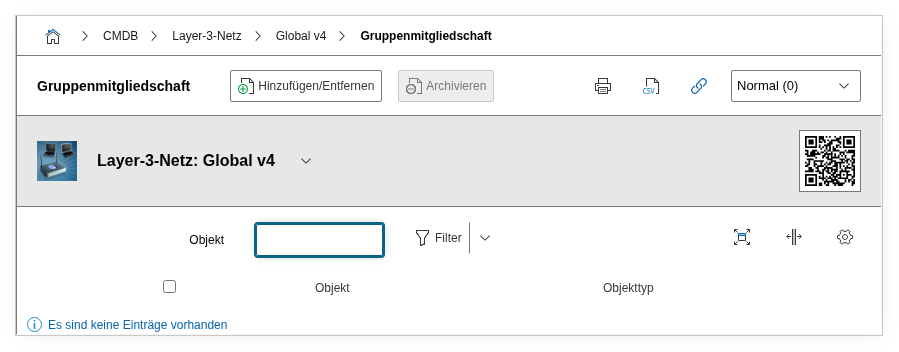
Fields#
Type#
Distinguishes between IPv4 and IPv6. Dialog field -- the value is derived from the type of the host address entry on the assigned device.
Host address#
The IP address itself, e.g. 192.168.10.25 or fd00::1a2b. This value originates from the "IPv4 address" or "IPv6 address" field in the Host address category on the end device.
Object#
The object that this IP address is assigned to -- e.g. a server, client, or router. Through this field, you can navigate directly to the assigned device. This is the central benefit of the IP List: the mapping from address to device at a glance.
Address allocation IPv4#
The type of address allocation for IPv4: Static, DHCP, or Not assigned. This value is mirrored from the host address entry on the end device.
Address allocation IPv6#
The type of address allocation for IPv6: Static, DHCPv6, SLAAC, or Not assigned. Analogous to the IPv4 field, but with IPv6-specific options.
Object (ID)#
The object ID of the assigned device as an integer. This field is used internally for linking.
Open IP list#
Link to the graphical IPAM view of the network, which displays all addresses as a table or grid.
Technical Reference#
| Property | Value |
|---|---|
| Category Constant | C__CATS__NET_IP_ADDRESSES |
| Type | Specific category |
| Multi-Value | Yes |
| Assigned to | Layer 3 Network (LAYER3_NET), Supernet (SUPERNET) |
Fields (API Reference)#
| Field | API Key | Type |
|---|---|---|
| Type | net_type | Dialog (selection) |
| Host address | title | Text |
| Object | assigned_object | Object browser (link) |
| Address allocation IPv4 | ipv4_assignment | Dialog (selection) |
| Address allocation IPv6 | ipv6_assignment | Dialog (selection) |
| Object (ID) | object | Integer |
| Open IP list | ip_address_link | Text |
API Examples#
Primarily a read category
The IP List is usually read via the API, not written. The entries are created automatically through host address assignments on the end devices. Direct write access to this category is possible but rarely practical -- data maintenance should be done via the Host address category on the individual objects.
Read Entries#
1 2 3 4 5 6 7 8 9 10 | |
The response contains all IP addresses assigned to this network object, including the associated object IDs and hostnames. A typical use case: Query the allocation of a subnet via the API and compare it with the actual network configuration.
Create Entry#
1 2 3 4 5 6 7 8 9 10 11 12 13 14 15 16 | |
Update Entry#
1 2 3 4 5 6 7 8 9 10 11 12 13 14 | |