Category: Network Zone#
The Network Zone category assigns one or more network zones to a Layer 3 network or supernet. It is a multi-value category -- any number of zone entries can be created per network object to represent different security or segmentation areas within a network.
Network Zone vs. Network -- two levels of network documentation
The Network category describes the technical parameters of a Layer 3 network: IP range, subnet mask, gateway. The Network Zone supplements this technical view with a logical segmentation: Which security zone does a network belong to? Typical zones are DMZ, Internal, Management, or Guest Network. This separation is crucial because one and the same subnet can operate in different security contexts -- and firewall rules are based on the zone, not the IP range alone.
Usage#
Typical use cases:
- Documenting firewall segmentation: Assign each network to the security zone it resides in. The zones correspond to the zones of your firewall configuration (e.g. Palo Alto Security Zones, Fortinet Zones). In the Report Manager, you can then evaluate which networks are in which zone -- the basis for firewall rule reviews and change requests.
- Compliance evidence: Regulatory frameworks such as ISO 27001, BSI IT-Grundschutz, and PCI-DSS require documented network segmentation. The Network Zone provides exactly this evidence: Which networks belong to the DMZ, which to the internal area, which to the management network? Auditors can verify the assignment directly in i-doit.
- Analyzing zone transitions: When two networks are assigned to different zones, traffic between them must flow through a firewall or gateway. Through the Network Zone, you can identify these transitions and compare them with the actual firewall rules -- a target/actual comparison for network security.
- Restricting IP range within the zone: The
Zone fromandZone tofields define the IP range that belongs to this zone within the network. This is useful when a subnet is divided into multiple zones -- for example, when the first 50 addresses belong to the server zone and the remaining ones to the client zone. - Microsegmentation: In modern network architectures (Zero Trust, SDN), networks are segmented at a fine-grained level. The multi-value capability of the category allows assigning multiple zones with different IP ranges to a single network -- ideal for documenting microsegmentation.
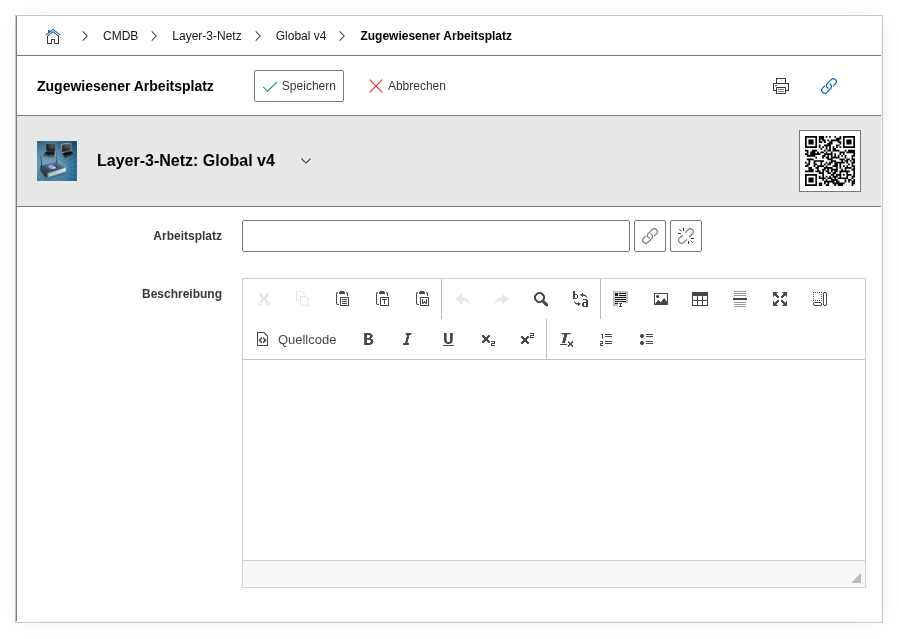
Fields#
Network zone object#
Link to the network zone object that represents the zone. The target object is typically of the object type Network Zone and carries a descriptive name such as DMZ, Internal-Server, or Management-VLAN. The link is established via the object browser. The network zone object can in turn carry additional information, such as a description of the security policies for this zone.
Zone from / Zone to#
The IP address range within the network that belongs to this zone. Zone from is the first IP address of the range, Zone to is the last. If the entire network is assigned to a single zone, these fields can remain empty -- the zone then applies implicitly to the entire IP range of the network. The fields range_from_long and range_to_long contain the numeric (long) representation of the IP addresses and are used internally for calculations and sorting.
Practical example: Split subnet
A /24 network (10.10.1.0/24) is split: Addresses .1-.127 belong to the zone Server-Internal, addresses .128-.254 to the zone Client-Internal. Create two entries in the Network Zone -- one with Zone from: 10.10.1.1 / Zone to: 10.10.1.127 and one with Zone from: 10.10.1.128 / Zone to: 10.10.1.254. This cleanly documents the segmentation within the subnet.
Description#
Free text for supplementary details about the zone assignment: justification for the assignment, reference to firewall rulesets, date of the last audit, or notes on planned changes.
Technical Reference#
| Property | Value |
|---|---|
| Category Constant | C__CATS__NET_ZONE |
| Type | Specific category |
| Multi-Value | Yes |
| Assigned to | Layer 3 Network, Supernet |
Fields (API Reference)#
| Field | API Key | Type |
|---|---|---|
| Network zone object | zone | Object browser (link) |
| Zone from | range_from | Text |
| Zone from (Long) | range_from_long | Text |
| Zone to | range_to | Text |
| Zone to (Long) | range_to_long | Text |
| Description | description | Text field (multi-line) |
API Examples#
Create Entry#
1 2 3 4 5 6 7 8 9 10 11 12 13 14 15 16 | |
Read Entries#
1 2 3 4 5 6 7 8 9 10 | |
Update Entry#
1 2 3 4 5 6 7 8 9 10 11 12 13 14 15 | |