Category: Shares#
The Shares category documents the network shares (SMB/CIFS shares) that a server provides. It is a multi-value category — any number of shares can be created, e.g. for various departmental or project drives on a file server. The category captures the share name, the UNC path, the associated volume, and the local path on the server.
Counterpart: Share access
The Shares category documents which shares a server provides. The counterpart — which clients access these shares — is maintained in the Share access category on the respective client objects. Together, both categories form a complete documentation of file sharing relationships.
Usage#
Typical use cases:
- File server documentation: Record the share name, UNC path, and local path on the server for every share. This creates a complete overview of all shares per file server — the basis for permission audits, migrations, and capacity planning.
- Migration and consolidation: During file server migrations, a report on all shares shows which shares need to be moved. In combination with the Share access category on the clients, it is immediately clear which users are affected and which mount points need to be adjusted.
- Permission documentation: In the description field, NTFS and share permissions can be documented — who has read access, who has write access. This is particularly important in regulated environments where access control must be verifiable.
- Capacity planning: The link to the volume (drive) shows on which hard drive or storage volume the share resides. Together with the drive category, storage utilization per share can be traced.
Hidden shares
Administrative shares (e.g. C$, ADMIN$, IPC$) should generally not be documented in i-doit — they exist on every Windows server and would unnecessarily inflate the overview. Focus on deliberately configured shares that are relevant to business operations. If needed, use the $ suffix in the share name to correctly represent custom hidden shares (e.g. Daten$).
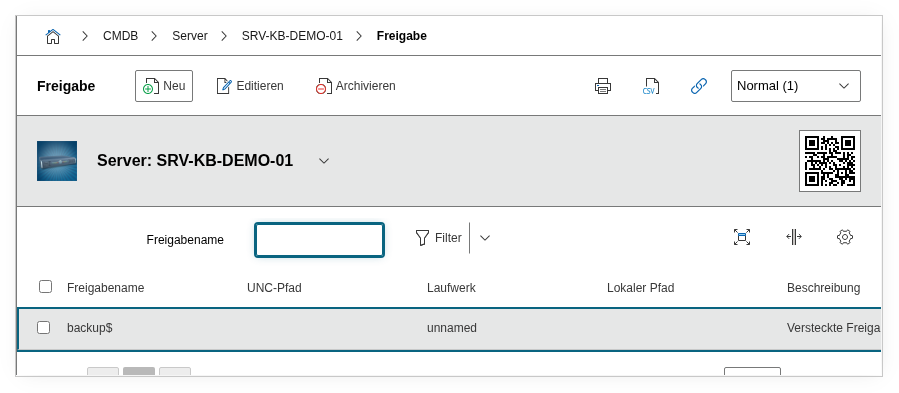
Fields#
Share name#
The name of the network share, e.g. Projekte, Daten$ or Software. This value is displayed in the list view and in reports and is the name under which the share is visible on the network.
UNC path#
The complete UNC path (Universal Naming Convention) of the share, e.g. \\SRV-FILE01\Projekte. This path is used by clients to connect to the share and should be entered exactly as it is reachable on the network.
Volume#
Link to the drive (volume) on the server where the share physically resides. Dialog field that offers the volumes created in the drive category for selection. This establishes the relationship between logical share and physical storage.
Local path#
The path on the server file system that is provided as a share, e.g. D:\Daten\Projekte or /srv/samba/projekte. Important for administration: the local path shows where the data physically resides on the server.
Description#
Free text for additional details: permissions (NTFS and share-level), quota settings, DFS namespace path, backup association, or special access rules.
Technical Reference#
| Property | Value |
|---|---|
| Category Constant | C__CATG__SHARES |
| Type | Global category |
| Multi-Value | Yes |
| Assigned to | Blade Server, Client, Server, Virtual Server |
Fields (API Reference)#
| Field | API Key | Type |
|---|---|---|
| Share name | title | Text |
| UNC path | unc_path | Text |
| Volume | volume | Dialog (selection) |
| Local path | path | Text |
| Description | description | Text field (multi-line) |
API Examples#
Create Entry#
1 2 3 4 5 6 7 8 9 10 11 12 13 14 15 16 17 | |
Read Entries#
1 2 3 4 5 6 7 8 9 10 | |
Update Entry#
1 2 3 4 5 6 7 8 9 10 11 12 13 14 15 16 | |