Category: Sound Card#
The Sound Card category documents the audio hardware of an object. It is a multi-value category — any number of entries can be created per object, e.g. for workstations with an onboard sound card and an additional professional audio interface. The category is primarily relevant for workstation computers — on servers, audio hardware is typically not present or deliberately disabled.
Automatic detection with JDisc
JDisc can automatically detect sound cards and import them into i-doit — including manufacturer and model designation. For large client rollouts, this saves considerable maintenance effort. Note, however, that audio devices detected on servers (e.g. virtual sound cards in VMs) are usually irrelevant and should be filtered during import.
Usage#
Typical use cases:
- Workstation inventory: Record the manufacturer and model of the installed sound card. Together with the categories CPU, Graphic Card and Memory, a complete hardware profile of the workstation is created. Particularly relevant for multimedia workstations, call center agents, and conference rooms.
- Specialized workstations: In recording studios, editorial offices, or at telephone workstations, the sound card is a business-critical component. The documentation of manufacturer, model, and driver version (in the description field) is indispensable for support and replacement procurement.
- Security and compliance auditing: In security-critical environments, audio hardware on servers and sensitive workstations is often deliberately disabled. A report on all objects with an active sound card can reveal deviations from the security policy.
- Hardware lifecycle: When replacing or upgrading the sound card (e.g. from onboard to a dedicated USB audio interface), archive the old entry and create a new one. The change history is thus seamlessly preserved.
Servers and virtual machines
On servers and virtual machines, the Sound Card category is typically not relevant and can be hidden via the object type configuration to keep the interface clean. Enable it selectively only for object types where audio hardware actually needs to be documented.
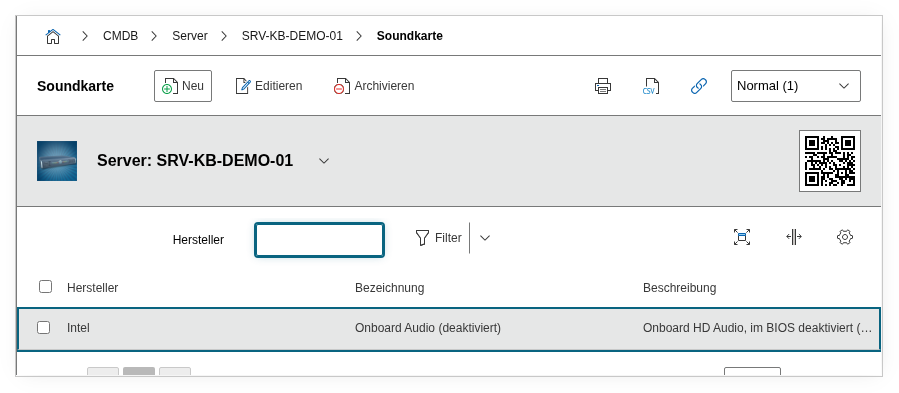
Fields#
Manufacturer#
The manufacturer of the sound card, e.g. Realtek, Creative, Focusrite or Intel. Dialog+ field -- custom values can be added as needed.
Title#
The name or model designation of the sound card, e.g. Realtek ALC897 or Focusrite Scarlett 2i2. This value appears in the category list view and in reports.
Description#
Free text for additional details: driver version, interface (PCIe, USB, onboard), number of input/output channels, supported sample rates, or special configuration notes.
Technical Reference#
| Property | Value |
|---|---|
| Category Constant | C__CATG__SOUND |
| Type | Global category |
| Multi-Value | Yes |
| Assigned to | Blade Server, Client, Server |
Fields (API Reference)#
| Field | API Key | Type |
|---|---|---|
| Manufacturer | manufacturer | Dialog+ (extensible selection) |
| Title | title | Text |
| Description | description | Text field (multi-line) |
API Examples#
Create Entry#
1 2 3 4 5 6 7 8 9 10 11 12 13 14 15 | |
Read Entries#
1 2 3 4 5 6 7 8 9 10 | |
Update Entry#
1 2 3 4 5 6 7 8 9 10 11 12 13 14 15 | |