Category: Storage Devices#
The Storage Device category (labeled "Device" in the English interface) documents the physical storage devices of an object -- hard drives, SSDs, tape drives, and other data carriers at the hardware level. It is a multi-value category -- any number of entries can be created per object, e.g. for servers with multiple physical hard drives in various bays.
This category represents the lowest layer of the storage architecture in i-doit: the physical device itself. Above it sit the Controller category (the RAID controller or HBA to which the device is connected), the RAID category (the logical grouping of multiple storage devices), and the Drive category (the logical volume with file system and mount point). Only when all four layers are maintained does a seamless documentation chain from the physical data carrier to the file system emerge.
Distinction from the Drive category
The Storage Device describes the physical hardware -- model, serial number, capacity, installation slot. The Drive category describes the logical view -- mount point, file system, used space. A physical SSD (storage device) can have multiple partitions documented as separate drives. Both categories complement each other and should be maintained in parallel.
Usage#
Typical use cases:
- Physical storage inventory: Record the type, manufacturer, model, capacity, and serial number of every physical data carrier. Together with the CPU and Memory categories, this creates a complete hardware profile. JDisc Discovery populates this category automatically with the detected devices.
- RAID assignment: Through the Hardware RAID group field, each storage device is assigned to its RAID array. This allows you to immediately trace which RAID array is affected in the event of a disk failure and whether redundancy is still intact. Hotspare disks are marked through the field of the same name.
- Controller assignment: The Controller field links the storage device to the RAID controller or HBA it is physically connected to. For servers with multiple controllers (e.g. an internal RAID controller and an external HBA for the SAN), this assignment is crucial for failure analysis.
- Documenting tape drives: Through the LTO type and FC address fields, tape libraries and individual tape drives can be documented -- important for backup concepts and the mapping of backup media to physical devices.
- Lifecycle and warranty: Serial number, firmware version, and installation slot form the basis for warranty processing and proactive replacement. A report such as "All storage devices with firmware older than version X" helps in planning firmware rollouts.
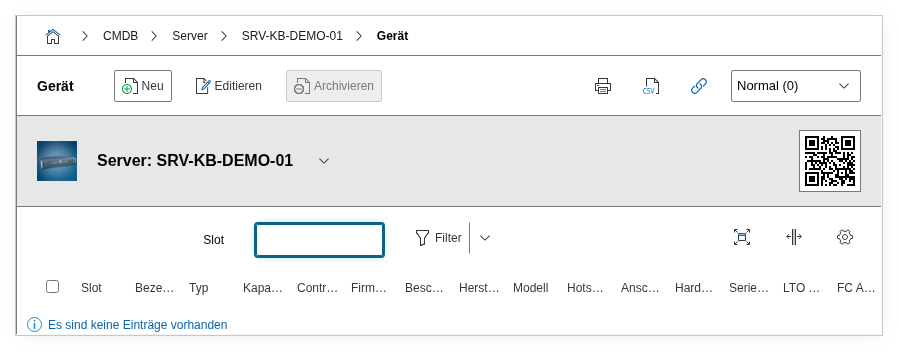
Fields#
Type#
The device type of the storage medium, e.g. HDD, SSD, NVMe, or Tape. Dialog+ field -- custom values can be added as needed. This value determines the fundamental technology and is the basis for reports like "All servers that still use HDDs instead of SSDs."
Title#
The name or model designation of the storage device, e.g. Samsung PM9A3 3.84TB or Seagate Exos X20 18TB. This value appears in the category list view and in reports.
Manufacturer#
The device manufacturer, e.g. Samsung, Seagate, Western Digital, or HPE. Dialog+ field -- custom values can be added as needed.
Model#
The specific model series or product designation, e.g. PM9A3 or Exos X20. Enables more detailed differentiation than the manufacturer alone -- especially for firmware updates, which are often model-specific.
Storage unit#
The unit of measurement for the capacity, e.g. MB, GB, or TB. Used together with the Capacity field.
Capacity#
The gross capacity of the storage device as stated by the manufacturer. In combination with the storage unit, this gives the total size, e.g. 3.84 TB or 18 TB. This value is the physical raw capacity -- the usable capacity after RAID overhead is documented in the RAID category.
Hotspare#
Indicates whether the storage device is configured as a hotspare (Yes or No). A hotspare is a spare disk that automatically takes over when a RAID member fails. Correct documentation of hotspares is crucial for evaluating RAID redundancy -- a RAID 5 without a hotspare is already unprotected if a second disk fails during a rebuild.
Connection#
The connector type through which the storage device is connected, e.g. SAS, SATA, NVMe, FC, or USB. Dialog+ field. Relevant for performance assessments and replacement planning -- a SAS controller cannot use a SATA disk as a replacement if the backplane connection is not compatible.
Controller#
Link to the Controller to which the storage device is physically connected. For servers with multiple RAID controllers or HBAs, this field shows which controller manages the disk -- crucial for outage analyses and controller firmware updates.
Hardware RAID group#
Link to the RAID group that the storage device is assigned to. Defines which physical disks together form a RAID array. Together with the hotspare field, this provides a complete picture of the physical RAID configuration.
Serial number#
The serial number of the storage device as stated by the manufacturer. Automatically read during JDisc import. For warranty claims and targeted replacement within a RAID array of identical disks, the serial number is the only unique identifier.
LTO type#
The LTO generation type for tape drives, e.g. LTO-8 or LTO-9. Dialog+ field. Only relevant for tape libraries and individual tape drives. The LTO generation determines the capacity and backward compatibility with older tapes.
FC address#
The Fibre Channel address of the storage device, relevant for SAN-connected devices and FC tape libraries. The format is typically a WWN (World Wide Name) or FC port address.
Firmware#
The current firmware version of the storage device. Relevant for compatibility checks and updates -- especially for SSDs, where firmware updates can fix critical bugs. Using reports, you can specifically identify devices with outdated firmware.
Slot#
The physical installation slot or slot number in the server or storage chassis, e.g. Slot 3 or Bay 12. This information is indispensable when physically replacing a defective disk -- the technician on site needs to know which disk in the chassis should be pulled.
Description#
Free text for additional details: performance class (e.g. "SAS 12 Gbit/s, 15k RPM"), warranty information, intended purpose (e.g. "dedicated for database log"), or configuration notes.
Technical Reference#
| Property | Value |
|---|---|
| Category Constant | C__CATG__STORAGE_DEVICE |
| Type | Global category |
| Multi-Value | Yes |
| Assigned to | Server, Client, Blade Server, Virtual Server |
Fields (API Reference)#
| Field | API Key | Type |
|---|---|---|
| Type | type | Dialog+ (extensible selection) |
| Title | title | Text |
| Manufacturer | manufacturer | Dialog+ (extensible selection) |
| Model | model | Dialog+ (extensible selection) |
| Storage unit | unit | Dialog (selection) |
| Capacity | capacity | Decimal |
| Hotspare | hotspare | Dialog (selection) |
| Connection | connected | Dialog+ (extensible selection) |
| Controller | controller | Dialog (selection) |
| Hardware RAID group | raid_group | Dialog (selection) |
| Serial number | serial | Text |
| LTO type | lto_type | Dialog+ (extensible selection) |
| FC address | fc_address | Text |
| Firmware | firmware | Text |
| Slot | slot | Text |
| Description | description | Text field (multi-line) |
API Examples#
Create Entry#
1 2 3 4 5 6 7 8 9 10 11 12 13 14 15 16 17 18 19 20 21 22 23 24 | |
Read Entries#
1 2 3 4 5 6 7 8 9 10 | |
Update Entry#
1 2 3 4 5 6 7 8 9 10 11 12 13 14 15 | |