Category: Interface#
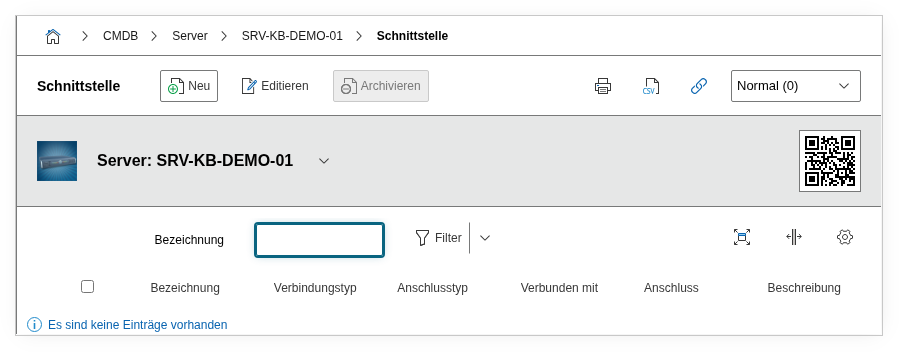
The Interface category documents the physical connectors of an object -- USB ports, serial and parallel interfaces, Thunderbolt jacks, display connectors, and similar connection points that are not network ports. It is a multi-value category -- any number of entries can be created per object, for example when a server has multiple USB ports, a serial management port, and a VGA output.
This category is often overlooked because network ports and power supply take center stage. Yet interfaces are indispensable for three areas: security audits (which USB ports are active and could serve as attack vectors?), peripheral tracking (which devices are connected where?), and hardware troubleshooting (is the serial console connected correctly?). Through the Connected to field, the category shows which devices are actually connected -- KVM switches, serial consoles, USB dongles for licensing, or external storage devices.
USB ports and security audits
In security-critical environments (ISO 27001, BSI IT-Grundschutz), USB ports must be documented and their status verified. Use the description field to record the lock status: "Disabled via BIOS policy," "Physically sealed (security seal #2025-042)," or "Approved for HID devices." A report on all interfaces of type USB shows the auditor the complete overview in seconds.
Usage#
Typical use cases:
- Peripheral documentation: Record which physical connectors a device has and which peripheral devices are connected to them. Through the Connected to field, you can establish a direct connection to another object -- for example a monitor on the DisplayPort, a scanner on the USB port, or a KVM switch on the serial interface. This makes it traceable at all times which peripherals are connected to which server.
- Completing the hardware inventory: Together with the Port, CPU, and Memory categories, this provides a complete picture of the physical equipment. Especially for patch panels and PDUs, seamless documentation of all connectors is crucial.
- Security audits and compliance: In regulated environments, USB ports and other interfaces must be recorded and their status documented. The combination of connection type (USB), plug type (Type-A), and description (lock status) provides the auditor with a complete picture. A report such as "All active USB interfaces on servers in Server Room A" directly answers typical audit questions.
- Troubleshooting out-of-band management: Serial console ports (COM1, COM2) are the last resort when network access and IPMI/iLO fail simultaneously. If it is documented which server is connected via which serial port to which console server, this saves valuable minutes in an emergency.
- Tracing cabling: Through the connector fields, every interface is part of the i-doit cabling model. This allows you to trace in the cable path which connection is linked via which cable to which counterpart.
Fields#
Title#
The name or identifier of the interface, e.g. USB 3.0 Front Left, COM1, or Thunderbolt 4 (Type-C). This value appears in the category list view and in reports. A descriptive name makes assignment easier when an object has many connectors.
Connection type#
The type of connection, e.g. USB, Serial, Parallel, Thunderbolt, or HDMI. Dialog+ field -- custom values can be added as needed. The connection type classifies the interface at a higher level and is well suited for filtering in reports.
Plug type#
The specific plug or socket type, e.g. USB Type-A, USB Type-C, DB-9, DB-25, or Mini-DisplayPort. Dialog+ field -- custom values can be added as needed. In combination with the connection type, this provides a precise picture of the physical interface.
Connected to#
The object and connection that this interface is connected to. Via the object browser, you can select an existing object and assign its connector. This creates a bidirectional connection that is visible in the i-doit cabling model -- for example a KVM switch connected via USB to a server.
Assigned connector#
The internal ID of the connector entry assigned to this interface. This field is typically managed automatically by i-doit and only needs to be set manually for API-based imports.
Assigned input/output#
The internal ID of the associated input/output counterpart in the connector model. This field is also typically maintained automatically and is primarily relevant for API usage.
Description#
Free text for additional details: position on the chassis (front/rear), lock status, maximum data rate, firmware version of the controller, or notes on usage approval.
Relationship direction#
The direction of the relationship in the i-doit relationship model. It is set automatically when a connection is established via the Connected to field. For manual API usage, the direction can be specified explicitly.
Technical Reference#
| Property | Value |
|---|---|
| Category Constant | C__CATG__UNIVERSAL_INTERFACE |
| Type | Global category |
| Multi-Value | Yes |
| Assigned to | Blade Server, Cable, Mobile Phone Contract, Client, Monitor, Patch Panel, PDU, Printer etc. |
Fields (API Reference)#
| Field | API Key | Type |
|---|---|---|
| Title | title | Text |
| Connection type | type | Dialog+ (extensible selection) |
| Plug type | plug | Dialog+ (extensible selection) |
| Connected to | assigned_connector | Object browser (link) |
| Assigned connector | connector | Integer |
| Assigned input/output | connector_sibling | Integer |
| Description | description | Text field (multi-line) |
| Relationship direction | relation_direction | Integer |
API Examples#
Create Entry#
1 2 3 4 5 6 7 8 9 10 11 12 13 14 15 16 | |
Read Entries#
1 2 3 4 5 6 7 8 9 10 | |
Update Entry#
1 2 3 4 5 6 7 8 9 10 11 12 13 14 15 | |