Category: Virtual Devices#
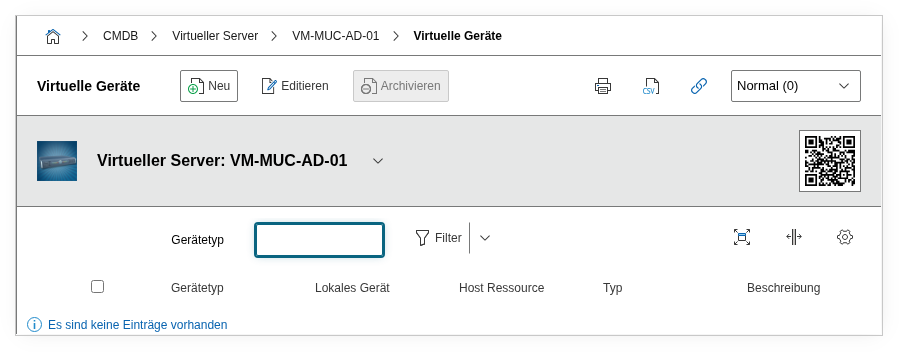
The Virtual Devices category documents the virtualized hardware components of a virtual machine — virtual network adapters (vNICs), virtual hard drives (vDisks) and other virtual devices that are assigned to the guest. It is a multi-value category – any number of entries can be created per object, since a VM typically has multiple virtual devices.
This category is maintained on the VM object (the guest) and establishes the bridge between the virtual and the physical layer: Each virtual device can be linked to a specific host resource — a physical port, a storage device or a RAID array on the hypervisor. This makes it possible to trace which physical hardware is behind a virtual resource.
Interaction with Guest Systems and Virtual Machine
The category Guest systems on the host lists the VMs. The category Virtual machine on the guest shows the assignment to the host. Virtual Devices goes one step further and documents the individual virtualized components of the VM — and links them with the physical resources of the host. All three categories together provide a complete picture of the virtualization relationship.
Usage#
Typical use cases:
- VM hardware inventory: Record all virtual devices of a VM — vNICs, vDisks, vCPUs and virtual interfaces. Together with the category Virtual machine this provides a complete documentation of the VM configuration, as it appears in the hypervisor management (vSphere Client, Hyper-V Manager).
- Mapping to the physical infrastructure: Using the host resource fields, you can trace which physical port, which storage device or which RAID array on the hypervisor is behind a virtual device. When a VM has performance problems, this link immediately shows whether the problem lies on the physical layer — e.g. an overloaded RAID array that is shared by multiple VMs.
- Network documentation for virtual machines: Virtual network adapters are documented via the fields Local port, Corresponding host port and Switch port group. In combination with the category Virtual Switches on the host, this provides a complete network topology of the virtualized environment.
- Storage assignment: Using the fields Host resource, Assigned storage device (host) and Host RAID array, you can trace the storage chain: from the virtual hard drive of the VM through the datastore backend to the physical RAID array or SAN LUN on the host.
- Migration and troubleshooting: Before a VM migration, the category shows which host resources the VM uses. After a migration, the host-side links must be updated — especially for storage and network assignments that can differ between hosts.
Fields#
Host resource (storage)#
Link to a storage device on the host that underlies this virtual device. Shows which physical storage device (e.g. a datastore or a LUN) actually stores the data of the virtual hard drive.
Host LDEV client#
Link to the logical device (LDEV) on the host that is assigned to the virtual device. Relevant in SAN environments where LUNs are presented as logical devices to the host and then passed through to the VM.
Assigned storage device (host)#
Link to a drive on the host that is provided to the VM as a virtual storage device. Enables the assignment of the virtual hard drive to a specific physical drive or a partition on the hypervisor.
Corresponding host port#
Link to the physical network port on the host that is behind the virtual network adapter. Shows through which physical uplink the VM actually communicates — crucial for network troubleshooting and bandwidth planning.
Host interface#
Link to the host interface (e.g. a VMkernel port or a management interface) that is assigned to the virtual device.
Host RAID array#
Link to the RAID array on the host on which the virtual hard drive resides. Together with the category RAID on the host object, you can trace which RAID level and which physical disks protect the data of the VM.
Local storage device#
Link to the local storage device within the VM — the virtual drive from the perspective of the guest operating system. This field connects the virtual devices layer with the category Drive on the VM object.
Local port#
Link to the local network port of the VM — the virtual network adapter from the perspective of the guest operating system. Connects the virtual devices layer with the Network port category on the VM object.
Host resource (interface)#
Link to a host interface that is assigned to the virtual device. Supplements the host port link with additional interface types.
Memory type#
The type of the virtual storage, e.g. Thick Provisioned, Thin Provisioned or Raw Device Mapping. Dialog+ field. Relevant for capacity planning: thin-provisioned disks initially occupy less space on the datastore but can grow unexpectedly.
Network type#
The type of the virtual network connection, e.g. E1000, VMXNET3 or VirtIO. Dialog+ field. The network type determines performance and driver compatibility in the guest operating system.
Switch port group#
Link to the port group of the virtual switch that the virtual network adapter is assigned to. The port group defines VLAN assignment, security policies and traffic shaping for the virtual network traffic.
Cluster storage#
Title of the cluster storage on which the virtual device resides — e.g. the name of a shared datastore in a VMware cluster or a Cluster Shared Volume in Hyper-V.
Cluster interface#
Title of the cluster interface through which the VM communicates within the cluster.
Path#
The path to the disk image file of the virtual hard drive, e.g. [datastore1] vm-web01/vm-web01.vmdk for VMware or /var/lib/libvirt/images/vm-web01.qcow2 for KVM. This information is indispensable for troubleshooting and manual storage operations.
Device type#
The type of the virtual device, e.g. Hard disk, Network adapter, CD/DVD drive or SCSI controller. Classifies the virtual device by its function.
Type (network)#
Additional classification for virtual network devices, e.g. Bridged, NAT or Host-only.
Description#
Free text for additional details: performance settings (e.g. IOPS limits, bandwidth reservations), special features in the configuration or notes on usage.
Technical Reference#
| Property | Value |
|---|---|
| Category Constant | C__CATG__VIRTUAL_DEVICE |
| Type | Global category |
| Multi-Value | Yes |
| Assigned to | Server, Client, Blade Server, Virtual Server |
Fields (API Reference)#
| Field | API Key | Type |
|---|---|---|
| Host resource (storage) | host_stor_device | Dialog (selection) |
| Host LDEV client | host_ldev_client | Dialog (selection) |
| Assigned storage device (host) | host_drive | Dialog (selection) |
| Corresponding host port | host_port | Dialog (selection) |
| Host interface | host_interface | Dialog (selection) |
| Host RAID array | host_raid | Dialog (selection) |
| Local storage device | local_stor_device | Dialog (selection) |
| Local port | local_port | Dialog (selection) |
| Host resource (interface) | local_interface | Dialog (selection) |
| Memory type | storage_type | Dialog+ (extensible selection) |
| Network type | network_type | Dialog+ (extensible selection) |
| Switch port group | switch_port_group | Dialog (selection) |
| Cluster storage | cluster_storage | Text |
| Cluster interface | cluster_interface | Text |
| Path | disk_image_location | Text |
| Device type | device_type | Text |
| Type (network) | virtual_network_type | Text |
| Description | description | Text field (multi-line) |
API Examples#
Create Entry#
1 2 3 4 5 6 7 8 9 10 11 12 13 14 15 16 | |
Read Entries#
1 2 3 4 5 6 7 8 9 10 | |
Update Entry#
1 2 3 4 5 6 7 8 9 10 11 12 13 14 15 | |