Category: Virtual Host (Overview)#
The Virtual Host (Overview) is an aggregation category that consolidates all virtualization-related information of a hypervisor on a single page. It combines the contents of the Virtual Host, Guest Systems, and Virtual Switches categories into one comprehensive overview.
This category contains no exclusive fields of its own -- it summarizes data that is maintained in the respective subcategories. Changes are not made directly in the overview category but in the linked individual categories. The purpose is a consolidated view of the entire virtualization configuration of a host, without needing to switch between multiple categories.
Aggregation category -- no separate data maintenance
This category is a pure summary. The displayed information originates from the Virtual Host, Guest Systems, and Virtual Switches categories. To change data, navigate to the respective individual category. The overview updates automatically when changes in the subcategories are saved.
Usage#
Typical use cases:
- Quick overview during incidents: During a host outage, the overview category shows at a glance: Is the server a hypervisor? Which VMs are running on it? Which virtual switches are configured? This information is crucial during an incident -- without it, the administrator would have to navigate between multiple categories and lose valuable time.
- Verifying virtualization documentation: When onboarding new hosts or during CMDB quality assurance, the overview immediately shows whether all virtualization-relevant categories are maintained. A host with
Virtual host = Yesbut without guest systems and without virtual switches is either not yet fully documented or an unused hypervisor -- both worth investigating. - Maintenance planning: Before a maintenance window for a hypervisor, the overview provides all relevant information: the list of affected VMs (from Guest Systems), the administration service for live migration (from Virtual Host), and the network configuration of the VMs (from Virtual Switches).
- Audit and compliance: In regulated environments, the overview serves as a compact reference for the entire virtualization configuration of a host. Auditors can see on a single page which workloads run on which physical hardware and how network separation is configured.
Included Categories#
The overview aggregates the following categories:
| Category | Constant | Content |
|---|---|---|
| Virtual Host | C__CATG__VIRTUAL_HOST | Hypervisor designation, license server, administration service |
| Guest Systems | C__CATG__GUEST_SYSTEMS | List of all VMs on this host |
| Virtual Switches | C__CATG__VIRTUAL_SWITCH | Configured vSwitches with port groups and uplinks |
Fields#
The displayed fields come from the subcategories. The following fields are displayed in the overview:
Virtual host#
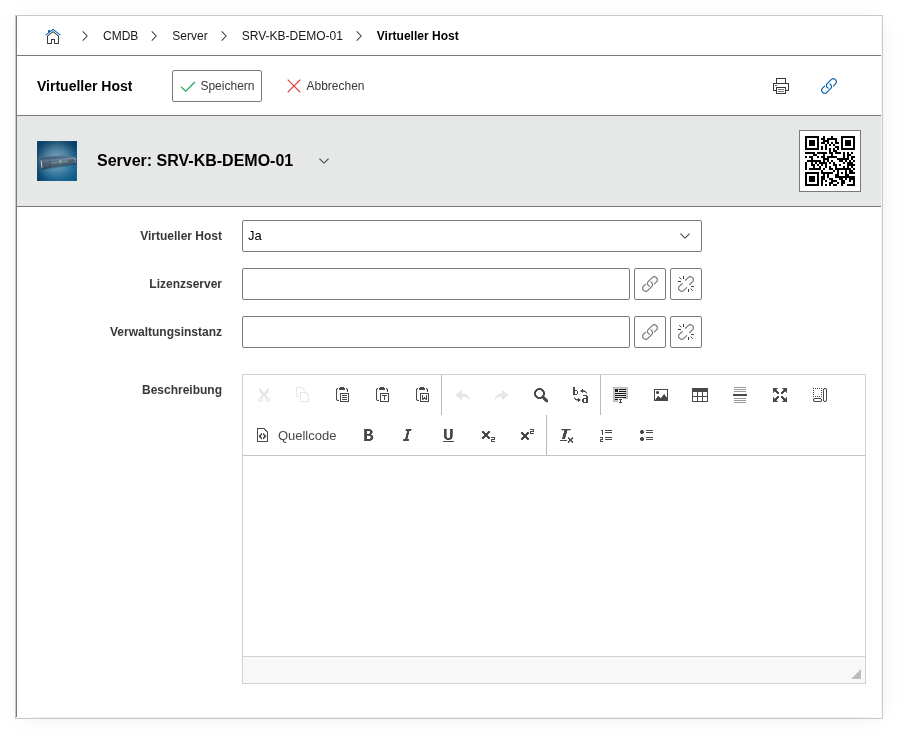
Indicates whether the object functions as a hypervisor (Yes or No). Originates from the Virtual Host category.
License server#
Link to the license server object. Originates from the Virtual Host category.
Administration service#
Link to the management system (e.g. vCenter, SCVMM). Originates from the Virtual Host category.
Description#
Free text description. Originates from the Virtual Host category.
Technical Reference#
| Property | Value |
|---|---|
| Category Constant | C__CATG__VIRTUAL_HOST_ROOT |
| Type | Global category (aggregation) |
| Multi-Value | No |
| Assigned to | Server, Blade Server, Cluster |
Fields (API Reference)#
| Field | API Key | Type |
|---|---|---|
| Virtual host | virtual_host | Dialog (selection) |
| License server | license_server | Object browser (link) |
| Administration service | administration_service | Object browser (link) |
| Description | description | Text field (multi-line) |
API access to aggregation categories
When accessing via C__CATG__VIRTUAL_HOST_ROOT, the same data as via C__CATG__VIRTUAL_HOST is returned. For reading and writing guest systems and virtual switches, the respective constants C__CATG__GUEST_SYSTEMS and C__CATG__VIRTUAL_SWITCH must be addressed separately.
API Examples#
Create Entry#
1 2 3 4 5 6 7 8 9 10 11 12 13 14 15 16 | |
Read Entries#
1 2 3 4 5 6 7 8 9 10 | |
Update Entry#
1 2 3 4 5 6 7 8 9 10 11 12 13 14 15 | |