Category: Virtual Machine#
The Virtual Machine category documents the virtualization properties of a guest object: on which host or cluster the VM runs, which virtualization system is used, and what state the VM is in. It is a single-value category -- exactly one entry exists per object.
The category represents the guest side of the virtualization relationship: It is maintained on the VM object and points to the host or cluster on which this VM is executed. The counterpart is the Guest Systems category, which lists all VMs on the host object. Both categories mirror the same relationship -- once from the guest perspective, once from the host perspective.
Essential for impact analyses
Without a maintained host assignment in this category, i-doit cannot automatically determine which VMs are affected during a host outage. The link between VM and host is the basis for every outage analysis in virtualized environments. Invest the time to keep this assignment correct and up to date -- when a live migration occurs, the CMDB documentation must be updated accordingly.
Usage#
Typical use cases:
- Host assignment and virtualization documentation: Document for every VM on which physical host or in which cluster it runs. In combination with the Guest Systems category on the host object, this creates a complete bidirectional virtualization map. In VMware environments, this corresponds to the VM-to-ESXi host assignment; in Hyper-V, the VM-to-Hyper-V host assignment.
- VM migration and vMotion: Before and after a live migration, the host assignment must be updated. A report such as "VMs whose host has changed in the last month" shows migration activity and helps uncover undocumented moves. With automated DRS (Distributed Resource Scheduler), the CMDB should be regularly reconciled with the actual state.
- Outage analysis and incident response: When a hypervisor fails, the Guest Systems category on the host shows which VMs are affected. Conversely, the Virtual Machine category on each VM shows which host it was running on -- both together enable a rapid impact assessment.
- Capacity planning: In combination with the Computing Resources category, it becomes clear which resources a VM has assigned and on which host these resources are provisioned. This is the basis for right-sizing and consolidation.
- License management: Oracle, Microsoft, and other vendors sometimes license software per physical host. The Virtual Machine category provides the VM-to-host assignment that is mandatory for license calculation.
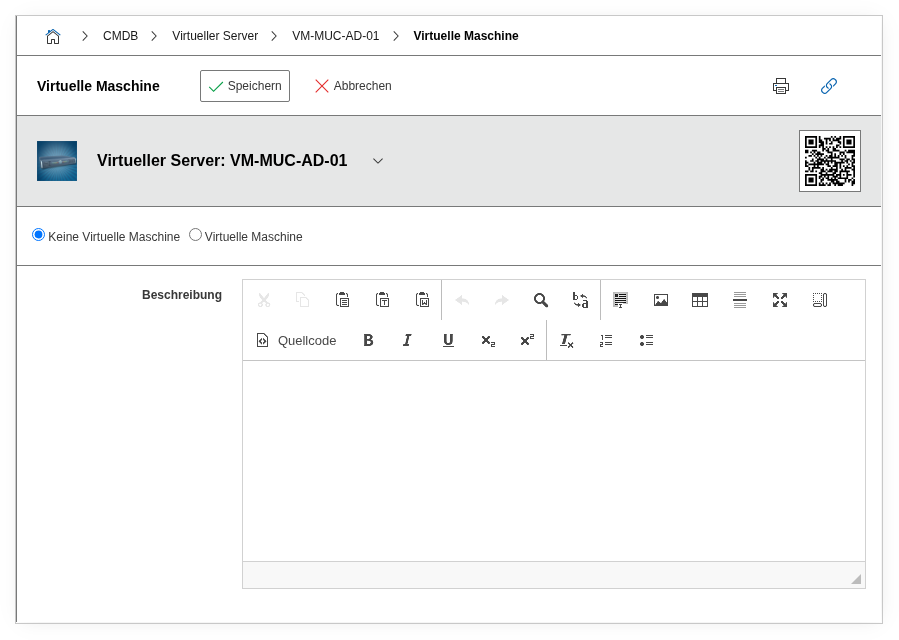
Fields#
Virtual machine#
A dialog field that specifies whether this object is a virtual machine. The possible values are Yes and No. Only when Yes is selected here are the remaining fields of the category relevant and the link to the host active.
Status#
The current operating state of the virtual machine: Running or Stopped. This value documents the planned or last known state -- it is not automatically synchronized with the hypervisor.
Runs on host/cluster#
The core field of the category: a link to the host server or cluster object on which this VM is executed. Via the object browser, only objects that are themselves configured as virtual hosts (Virtual Host categories assigned) are offered. This assignment is the basis for the bidirectional virtualization relationship -- the host selected here automatically shows the VM in its Guest Systems category.
Virtualization system#
The virtualization system in use, e.g. VMware ESXi, Microsoft Hyper-V, KVM/QEMU, or Proxmox VE. Dialog+ field -- custom values can be added as needed. This information is useful for reports that group VMs by virtualization technology, e.g. during a planned migration from Hyper-V to VMware.
Configuration file#
The path to the configuration file of the VM on the hypervisor, e.g. /vmfs/volumes/datastore1/srv-web-01/srv-web-01.vmx for VMware or /etc/libvirt/qemu/srv-web-01.xml for KVM. This field is helpful for administrators who work directly at the hypervisor level and need to edit or back up the VM definition.
Host in cluster#
When the VM is assigned to a cluster, the specific physical node within the cluster on which the VM actually runs can be specified here. In a VMware cluster with three ESXi hosts, this field shows on which of the three nodes the VM currently runs -- one level more detailed than the cluster assignment alone.
Description#
Free text for additional details: migration history, special configuration (CPU/RAM reservation, affinity rules), planned changes, or references to change tickets.
Technical Reference#
| Property | Value |
|---|---|
| Category Constant | C__CATG__VIRTUAL_MACHINE__ROOT |
| Type | Global category |
| Multi-Value | No |
| Assigned to | Server, Blade Server, Client, Virtual Server |
Fields (API Reference)#
| Field | API Key | Type |
|---|---|---|
| Virtual machine | virtual_machine | Dialog (selection) |
| Status | state | Dialog (selection) |
| Runs on host/cluster | hosts | Object browser (link) |
| Virtualization system | system | Dialog+ (extensible selection) |
| Configuration file | config_file | Text |
| Host in cluster | primary | Dialog (selection) |
| Description | description | Text field (multi-line) |
API Examples#
Create Entry#
1 2 3 4 5 6 7 8 9 10 11 12 13 14 15 16 17 18 | |
Read Entries#
1 2 3 4 5 6 7 8 9 10 | |
Update Entry#
1 2 3 4 5 6 7 8 9 10 11 12 13 14 15 | |