Preparing the VIVA Installation#
Before using the i-doit add-on VIVA for the first time, you need to install it.
System requirements#
In addition to the generally applicable system requirements and system settings for i-doit, this add-on requires the following conditions to be met on the system where it is installed:
- A working installation of i-doit in a version currently supported by Synetics is installed.
- The PHP setting short_open_tag is enabled (On).
- Optionally, for generating a cleaned network plan, Graphviz (in the form of the dot or neato binaries) is required on the system, and the PHP function exec must be allowed to execute. This does not work on a Windows operating system.
Download, installation, update, (de-)activation#
See article i-doit add-ons.
Permission management#
i-doit provides a fine-grained permission management system, which is also used for VIVA. Permissions can be assigned per user/user group under Administration → Authorization system → VIVA. The following permissions are available:
- Read access: Editing is not possible.
- Write access: Read, create, save, and delete information.
- Administrative access: No restrictions.
To simplify the initial steps, the person group VIVA is created during installation, which already has administrative permissions. If users should receive these permissions, it is sufficient to add them to this person group. In this way, the Admin person group also receives administrative access.
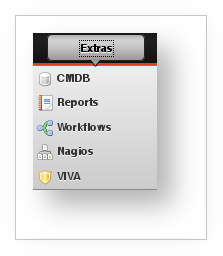
After installation, the logged-in user does not yet have the corresponding group membership. Therefore, VIVA does not appear in the Extras menu either. Once the person object corresponding to the user has been added to the person group, the user must log in again for the change to take effect. After that, VIVA will appear in the Extras menu.
Migrating from the previous ITGS module#
Since i-doit version 0.9.9-6 pro, a module for documenting IT-Grundschutz-relevant information has been included. VIVA fully replaces it and extends it with numerous new functions. If data has already been documented in the old module, it can be transferred to VIVA without residue.
Preparing the migration#
To ensure a smooth transfer of data from the legacy system, the following assumptions are made:
- The IT-Grundschutz catalogs EL 11 from 2009 are used in the old module.
- The catalogs EL 12 from 2011 are to be used in VIVA. The import must already be completed.
- In the old module, the object type ITGS Group was used for documenting target groups.
- Objects assigned to these ITGS Groups are of a similar kind, meaning they correspond to the definition of target groups and target objects.
- The IT-Grundschutz-relevant documentation is taken from the ITGS Groups and those objects in i-doit that do not inherit their documentation from any ITGS Group.
- These non-grouped objects are each transformed into target groups.
- Based on the title of the currently used tenant, a new information domain is created. Existing information domains in VIVA are not affected.
- The layer assignment of the groups is determined based on their linked modules.
Performing the migration#
If the prerequisites are met and the old module has not (yet) been deleted, the migration can be started via the web interface under VIVA → Migration. There you can choose between two actions:
- Start migration ...
- Remove old module ...
The first option guides you through the migration and shows the progress of the respective steps. After the user has defined the ITGS Groups as target groups and assigned them to an IT-Grundschutz layer, the migration is performed. Clicking Finish redirects to the newly created information domain.
Optionally, the old module including all data (objects, categories) can be deleted after the migration. This step is irreversible.
Before performing either of the mentioned actions, a backup of the database and the i-doit installation should be created so that you can revert to a working state in case of errors.