VIVA Wizards#
While the chapter on the Procedure with VIVA describes a manual path for documenting all IT-Grundschutz-relevant information, the add-on VIVA includes a wide variety of wizards to partially automate this process. The wizards analyze the data in VIVA and in the i-doit CMDB in advance to generate suggestions that the user can subsequently review and/or accept. Complex relationships within the information domain become visible in this way. The user thus has the opportunity to document more quickly and conveniently.

The wizards can be found below each information domain as buttons in the respective action and navigation bars. When a wizard is opened, a popup appears that integrates seamlessly into the VIVA interface. All wizards follow a similar pattern:
- Analyze data from VIVA and/or the IT documentation in i-doit
- Compile suggestions and prepare them visually
- Post-process suggestions by the user
- Save or discard suggestions by the user
The wizards support an extensive process that runs through an essential part of the documentation. This process is explained as a possible approach in the chapter Example of a possible workflow.
The following sections describe the specific properties of the various wizards. They are divided into Target group wizards and Protection needs wizards.
Target group wizards#
This type of wizard suggests suitable target groups based on existing data. New target groups with IT-Grundschutz numbers and titles can thus be conveniently created. Suggestions can be discarded or, where appropriate, expanded. The individual wizards are described in more detail below. The order refers to the possible approach described in the appendix Example of a possible workflow. The wizards can be found within the respective layers.
| Wizards | Source: object types | Source: categories |
|---|---|---|
| IT service wizard (layer 5 Applications) | IT service | IT service components |
| Application wizard (layer 3 IT Systems) | Software (applications, services, operating systems, etc.) | Software assignment, installation |
| IT system wizard (layer 2 Infrastructure) | (Virtual) active hardware (servers, clients, etc.) | Location assignment |
| IT system wizard (layer 4 Networks) | (Virtual) active hardware (servers, clients, etc.) | Network ports |
| IT system wizard (layer 5 Applications) | (Virtual) active hardware (servers, clients, etc.) | Software assignment, installation |
| Infrastructure wizard (layer 3 IT Systems) | Container objects (buildings, rooms, etc.) | Location assignment |
)
This wizard analyzes the CIs of type Service in the IT documentation of i-doit, specifically the Service Components category. The components are analyzed from various perspectives and, if applicable, added to the list of suggested target objects. This is done recursively. The following CIs are suggested when found:
- The service itself
- Subordinate services; their components are also analyzed
- Software CIs
- Installed software of components (based on the Software Assignment category, i.e., CIs of type Application, System Service, Operating System, etc.)
- Installed software (based on the relationship object)
- Members of object groups
- Members of clusters
- Cluster services
Even if no matching CIs are identified, a suggestion is generated from the service. The overall result of the analysis -- and thus the suggestion -- consists of a list of services whose names (consisting of the object title) are used as group identifiers, and optionally matching CIs that meet the criteria of the layer, i.e., represent an application in the broader sense.
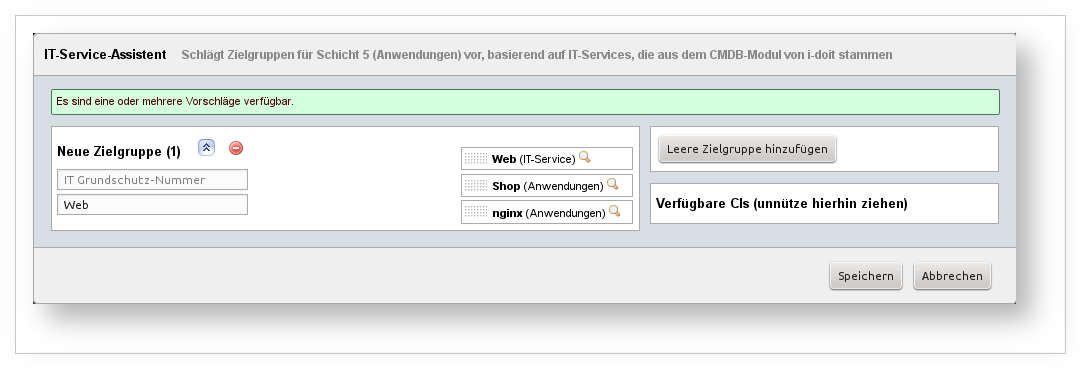
Example: In the IT documentation of i-doit, there is an object of type Service with the title "Web". In its Service Components category, three objects are linked: a software object of type Applications ("Apache HTTP Server"), an object of type Server ("web server") on which an application is installed (Software Assignment category; named "Shop"), and a relationship object (representing a software assignment; named "nginx runs on Reverse Proxy"). From this, a suggestion for a target group is generated: the name corresponds to the service, i.e., "Web". The linked target objects include the application "Apache HTTP Server", "Shop", and "nginx".
)
To get suggestions for target groups in the IT Systems layer, this wizard is useful. It draws data from layer 5 Applications. If there are target groups there whose target objects have a relation to potential target objects in this layer, they are grouped and suggested as one or more groups.
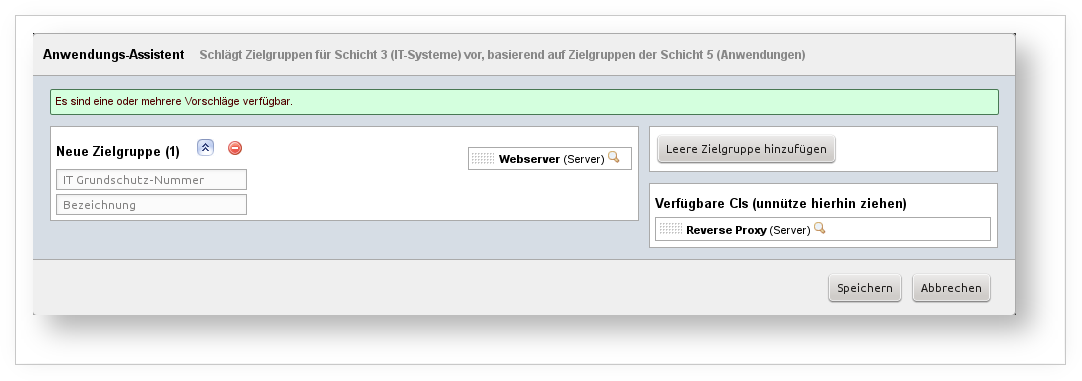
Example: In layer 5 Applications, there is the group "A 1 Web". It contains the target object "Apache HTTP Server", which corresponds to the object of the same name in the CMDB. This (software) object is installed on a server ("web server") (category Installation or Software Assignments). This server is therefore suitable as a target object for a group in layer 3 IT Systems. If this target object is not yet assigned to any target group, a suggestion is generated to create a target group containing the CI "web server".
)
Buildings and rooms contain hardware components. If there are corresponding target groups for the hardware in layer 3 IT Systems, it is advisable to also group these buildings and rooms into target groups. This wizard takes care of that. It analyzes the location assignments of already existing target objects in layer 3 and generates suggestions for target groups in layer 2 Infrastructure. All target objects from layer 3 that have a location assignment but whose location has not yet been captured as a target object of a group in layer 2 are considered here. Container objects qualify as target objects for layer 2, meaning objects whose object type is suitable as a location. The suggestions are recursive, meaning the entire chain of location assignments is considered (excluding "Root Location").
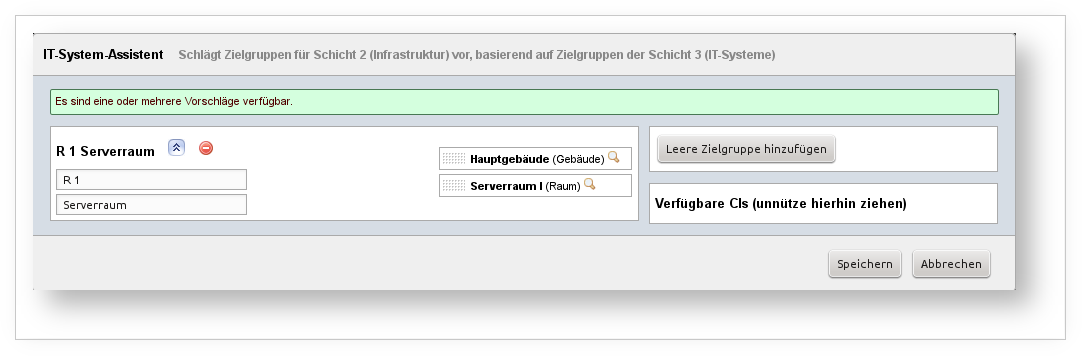
Example: In layer 2 IT Systems, the target group "S 1 web server" exists, to which the target object "web server" is assigned. This server is located in the room "Server Room I". The room is located in the "Main Building". If not already done, the wizard suggests creating a target group containing the room and the building.
)
In the IT documentation of i-doit, there are many ways to document connections between two objects. An essential one is the connection via network ports. In this way, entire network infrastructures can be modeled down to the smallest detail. This wizard uses this data to suggest communication links between target groups. These target groups all come from layer 3 IT Systems. The wizard therefore analyzes target objects from layer 3 that correspond to an object in the CMDB with entries in the Network Ports category. As in the Port Overview category, there may be a connection between two or more objects with a start point (the object itself), intermediate objects (for example, passive components such as patch panels), and an end object used for further analysis. If there is a target object in layer 3 IT Systems for this end object, it is checked whether this target object is assigned to a target group that does not yet have a communication link with the target group of the starting object. If this is the case, both target groups are suggested as communication links.
Communication links ultimately lead to a "cleaned network plan" that abstracts from the details and only shows essential information to maintain clarity. Therefore, the detail richness of the CMDB data must also be abstracted, which this wizard attempts to handle for the user.
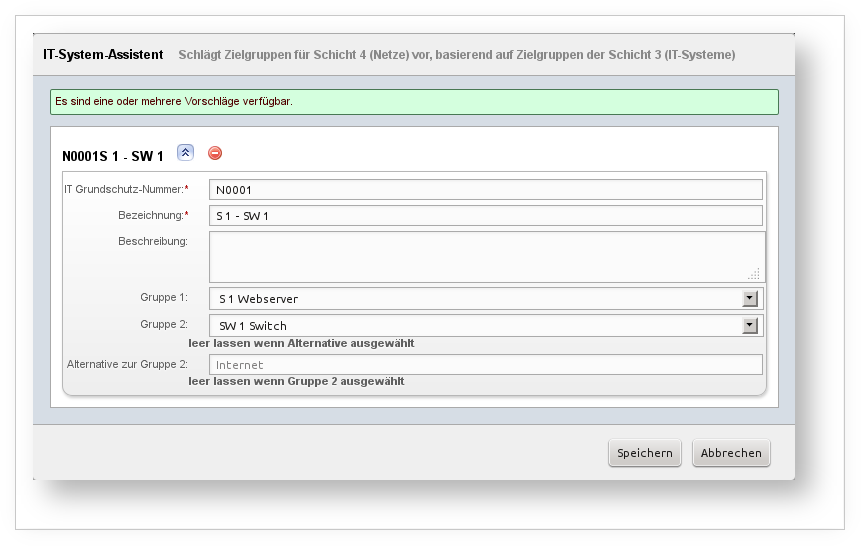
Example: An object of type Server with the title "web server" belongs as a target object to the target group "S 1 web server" (layer 3 IT Systems). Also in this layer, the target group "SW 1 Switch" exists with the target object "Switch I", which corresponds to the object of the same name in the CMDB. In the CMDB, both objects are connected via the port category. The fact that passive components such as patch panels are interposed between them has no effect. If both target groups do not yet share a communication link in layer 3 Networks, the wizard suggests one.
)
Analogous to the Application wizard (layer 3 IT Systems), this wizard works as follows: based on the target groups in layer 3, suggestions for target groups in layer 5 Applications are generated. For this purpose, the Software Assignment category in the i-doit CMDB is used.
)
Similar to the previous wizard, this one works analogously to the IT System wizard (layer 2 Infrastructure). Target groups from layer 2 Infrastructure are analyzed to determine whether target groups for layer 3 can be generated from them. For this purpose, the Location Assignment category in the i-doit CMDB is used.
Protection needs wizards#
Wizards of this type suggest how the protection needs should be configured. To do this, related target groups are analyzed so that inheritance of protection needs results, as suggested in the BSI standard. (See BSI standard 100-2, chapter 4.3 Protection Needs Assessment.) In short, the highest protection class (normal, high, very high) for each basic value (confidentiality, integrity, availability) is inherited. The examples in the following sections illustrate this principle.
The wizards are located within the target groups to directly assist with the respective protection needs assessment. If the protection needs for multiple target groups need to be edited simultaneously, the wizards within the layers can be used. The following sections describe the respective wizard for each layer. Suggestions can be generated here for layers 2 Infrastructure and 3 IT Systems.
)
Similar to the Application wizard (layer 3 IT Systems), the target groups of layer 5 Applications are analyzed to determine whether they are related to a specific group (or multiple groups) in this layer. The software assignment/installation information is used for this purpose.
Example: The target group "Website" exists in layer 5 Applications. The protection needs are set as follows:
- Confidentiality: normal
- Integrity: normal
- Availability: very high
Additionally, the target group "Forum" exists in the same layer with the following protection needs:
- Confidentiality: high
- Integrity: normal
- Availability: high
In layer 3 IT Systems, the corresponding target group "web server" exists, on which the website and the forum are hosted. The wizard now suggests the following protection needs:
- Confidentiality: high
- Integrity: normal
- Availability: very high
)
As with the IT System wizard (layer 2 Infrastructure), the location assignment is analyzed to determine the protection needs of a target group (or multiple groups) in layer 2 that is related to a target group in layer 3 IT Systems.
Example: In layer 2, the target group "Server Room" exists. In this room, there are two servers covered by the target groups "Email Server" and "web server" in layer 3.
Protection needs of "Email Server":
- Confidentiality: very high
- Integrity: high
- Availability: very high
Protection needs of "web server":
- Confidentiality: high
- Integrity: normal
- Availability: very high
Based on the location assignment, the wizard suggests the following protection needs for "Server Room":
- Confidentiality: very high
- Integrity: high
- Availability: very high