Installing, Updating, and Activating Add-ons#
For an add-on to be installed, updated, and activated in i-doit, a specific directory hierarchy must be followed. Within the add-on directory, files such as init.php are expected to ensure a consistent program flow.
Installing an Add-on#
Add-ons must be provided as a ZIP archive in order to be installed by i-doit. The ZIP file is uploaded via the Admin Center, which triggers the internal installation routines. The directory structure within the archive must follow a predefined pattern. Here is an example using the "Example" add-on (identifier "example"):
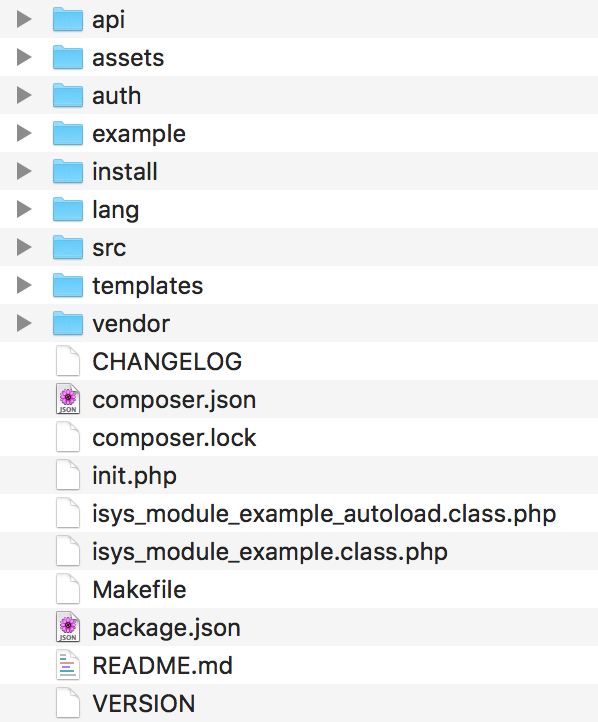
The archive must contain the package.json file at the top level (alongside src) so that i-doit can find it. This file contains various important metadata that is needed during installation. Additional information can be found in the article Add-on Metadata (package.json).
The file is automatically moved to the add-on directory after successful installation.
Updating an Add-on#
Unlike the i-doit core, there is no difference between "installation" and "update" packages for add-ons. The decision between "What happens during installation?" and "What happens during update?" is explained in the section "Installing and Uninstalling".
Extending the System and Tenant Databases#
Frequently, an add-on extends the i-doit tenant database with its own tables and content. For this purpose, an add-on can include the files update_data.xml and update_sys.xml, which must be located in the add-on directory underneath the "install" folder. Under defined conditions, SQL queries are executed that can be used both for installing and updating database tables and content. The file update_data.xml is used for the selected tenant databases, while update_sys.xml is applied exclusively to the system database.
1 2 3 4 5 6 7 8 9 10 11 12 13 14 15 16 17 18 19 20 21 22 23 24 25 26 27 28 29 30 31 32 33 34 35 36 37 38 39 40 41 42 43 44 45 46 47 48 49 50 51 52 53 54 55 56 57 58 59 60 61 62 63 64 65 66 67 68 69 70 71 72 73 74 75 76 77 78 79 80 81 82 | |
The following checks and conditions are available:
- C_CREATE_TABLE (including aliases "C_UPDATE", "C_INSERT_INTO", "C_ALTER_TABLE", "C_TABLE_EXISTS", and "C_DROP_TABLE") Condition: Table name Checks whether the specified table exists.
- C_VALUE_EXISTS Condition: SQL query Executes the specified query and checks whether there is a result (found rows > 0).
- C_ADD_FIELD Condition: Table and column in the following format:
,
Checks whether the specified field exists in the table. Activating and Deactivating#
For an add-on to be activated and deactivated in the Admin Center, the isys_module_example class must implement the idoit\AddOn\ActivatableInterface interface. This requires three methods that are executed during the corresponding actions:
 1
 2
 3
 4
 5
 6
 7
 8
 9
10
11
12
13
14
15
16
17
18
19
20
21
22
23
24
25
26
27
28
29
30
31
32
33
34
35
36
37
38
39
40
41
42
43
    /**
    * Checks if a module is active.
    *
    * @return integer|bool
    */
    public static function isActive()
    {
        return isys_module_manager::instance()->is_active('example');
    }

    /**
    * Method that is called after clicking "activate" in Admin-Center for specific mandator
    *
    * @param isys_component_database $mandatorDb
    *
    * @return boolean
    */
    public static function activate($mandatorDb)
    {
        try {
            // Custom logic...
            return true;
        } catch (Exception $e) {
            return false;
        }
    }

    /**
    * Method that is called after clicking "deactivate" in Admin-Center for specific mandator
    *
    * @param isys_component_database $mandatorDb
    *
    * @return boolean
    */
    public static function deactivate($mandatorDb)
    {
        try {
            // Custom logic...
            return true;
        } catch (Exception $e) {
            return false;
        }
    }
If the methods are not needed, they can simply return true. Typically, these methods are used to set permissions or install dashboard widgets.
Installing and Uninstalling#
Similar to activating and deactivating an add-on, there is also a corresponding interface for installing and uninstalling: idoit\AddOn\InstallableInterface. This also requires three methods that must be implemented:
 1
 2
 3
 4
 5
 6
 7
 8
 9
10
11
12
13
14
15
16
17
18
19
20
21
22
23
24
25
26
27
28
29
30
31
32
33
34
35
36
37
38
39
40
41
42
    /**
    * Checks if a add-on is installed.
    *
    * @return integer|bool
    */
    public static function isInstalled()
    {
        return isys_module_manager::instance()->is_installed('example');
    }

    /**
    * Basic installation process for all mandators.
    *
    * @param  isys_component_database $tenantDatabase
    * @param  isys_component_database $systemDatabase
    * @param  integer                 $moduleId
    * @param  string                  $type
    * @param  integer                 $tenantId
    *
    * @since  i-doit 1.12
    * @return void
    */
    public static function install($tenantDatabase, $systemDatabase, $moduleId, $type, $tenantId)
    {
        if ($type === 'install') {
            // Logic for installation.
    }

        if ($type === 'update') {
            // Logic for update.
        }
    }

    /**
    * Uninstall add-on for all mandators
    *
    * @return void
    */
    public static function uninstall()
    {
        // Custom logic...
    }
The install and uninstall methods can be used to perform complex tasks that go beyond simple SQL queries.
Deprecated installation logic
In older i-doit versions (< 1.12), the "install" method is not yet supported -- a separate logic must be applied in those cases.