Programming Categories#
Categories are the core of i-doit. They enable the maintenance of information for specific subject areas and additionally offer functionalities to use this data meaningfully. Should the default set of categories not meet the requirements, "custom categories" provide a remedy. Simple use cases can be mapped via a graphical configuration interface without any programming knowledge. However, once the application case reaches a medium complexity, the limitations of "custom categories" quickly become apparent. At that point, only a physical i-doit category helps.
Advantages of a Programmed Category#
Programmed categories are, compared to custom categories, completely free in terms of display and the form types used.
Additionally, it is possible to group this type of category so that so-called "folder categories" are displayed in the i-doit frontend (e.g., "Network", "Local Mass Storage", or "Cabling").
Due to the self-implemented data storage, it is theoretically also possible to access the APIs of third-party systems and thus integrate them "on-the-fly" into i-doit (see the "All Tickets" or "Monitoring" categories).
Disadvantages of a Programmed Category#
Freedom famously also brings responsibility. With programmed categories, it behaves similarly. With a code-based category, the developer decides on the offered feature set. Furthermore, it should be noted that the underlying code integrates into the i-doit ecosystem. Although we of course avoid breaking changes as much as possible, it is nevertheless not excluded that changes through future updates may become necessary.
Additionally, in the case of errors in your own code that result in data loss, no support can be provided -- to prevent such cases, the Developer Partner Platform can be used for exchange with the i-doit developers.
Required Files for a Custom Category#
To create a custom global category, essentially only three files are needed. In the case of a multi-value category, a fourth file is added:
Data Access Object PHP Class#
The so-called "Data Access Object" class (DAO for short) is needed to define the attributes of a category. It additionally contains all necessary methods to interact with the data in the database. This means: read, write, and delete (CRUD).
Simple data structures can be handled "out-of-the-box" by i-doit. Here, generic functions are used that operate based on the property definitions. This way, CRUD operations can be performed.
However, if more complex data structures (n:m links and references) need to be processed, custom methods for CRUD operations must be provided.
List DAO PHP Class (only for Multi-Value)#
Multi-value categories consist of two parts: a list and the detail view of a record. For the list, a special "List DAO" is required that defines the attributes to be displayed. With the help of optional methods, the category data can be prepared for the GUI (e.g., for creating links or reformatting values).
User Interface PHP Class#
The User Interface class (UI for short) provides the link between the i-doit frontend and the DAO. This class is typically used to process data from the associated DAO and prepare it for the Smarty template.
If the category only contains simple attributes, it is possible to leave this class empty, since (similar to the DAO) i-doit can handle this task independently.
However, if complex data or a custom display in the frontend is involved, the responsible logic must be implemented here.
Smarty Template#
The Smarty template is needed to display the data from the DAO or UI to the user. This is done in the form of HTML. Unlike the DAO and UI classes, it is not possible to have i-doit handle this process -- the template must be present and handle all necessary tasks itself.
So that not every template has to define its own forms, the i-doit core provides many "Smarty Plugins", more on that later.
Required Preparation for a Custom Category#
In addition to the PHP files and the template, a category needs two additional parts:
- The category must be registered in the backend. This is done via a record in the database table
isysgui_catg. - The category needs its own database table.
Registering the Category in the Backend#
For i-doit to "know" our category and process it accordingly, it must be registered in the table isysgui_catg. This means we create a record that points to the DAO class and category table. For the CPU category, this entry looks as follows:
1 2 3 4 5 6 7 8 9 10 11 | |
The table contains additional fields that we do not need to process. When creating a record, these can therefore be ignored. Below is an explanation of the various fields:
isysgui_catg__type
Defines the category "type" for internal use. We distinguish the following types:
1 - View: A category without its own data or database table; it merely displays data that was prepared in the UI class.
2 - Edit: A normal category that can be edited.
3 - Backward: The "backward" page of another category (e.g., "Person Groups > Members").
4 - Assignment: A category that merely assigns object references (e.g., "Contact Assignment").isysgui_catg__title
Contains the language constant of the category.isysgui_catg__const
Contains the constant of the category. This is very important as it serves internally as an identifier (we do not use IDs in the code, since these can change from installation to installation). The category constant should ALWAYS follow the formatC__CATG__*and contain no special characters, as it is converted to a PHP constant by i-doit.isysgui_catg__source_table
The name of the associated database table. Note that the name does NOT end with "_list", although the actual database table does.isysgui_catg__class_name
The name of the associated DAO class.isysgui_catg__parent
This field contains an optional reference to another category. It determines whether the category is displayed beneath another category ("folder category").isysgui_catg__list_multi_value
The content of this field (0 or 1) determines whether a category is a multi-value category.isysgui_catg__status
The status determines, as with objects and categories, whether the respective record has the "Normal" (= 2) status and can be used.isysgui_catg__standard
A "standard" category is available in every object type and is only displayed as an icon in the navigation tree of an object (see "Relationships", "Status Planning", "All Tickets", etc.).isysgui_catg__overview
This field defines whether the category can be used on the overview page or not.
This required query is ideally executed during the installation of your own add-on; see also the article "Installing, Updating, and Activating Add-ons".
Category Database Table#
A category requires a number of predefined fields so that i-doit can map global behavior related to categories.
1 2 3 4 5 6 7 8 9 10 11 12 13 14 15 16 17 18 19 20 21 22 23 24 | |
Here you can find additional information about our database tables.
Please note that category tables must contain the prefix isys_catg_ and the suffix list.
The following four table fields are required by i-doit and must always be part of a category table:
*__id*__isys_obj__id*__description*__status
All additional fields can be used for your own category data.
The query to create the table is also ideally executed during the installation of your own add-on; see also the article "Installing, Updating, and Activating Add-ons".
DAO Class#
Minimum Requirements / Basics#
A DAO class must fulfill the following conditions:
- The class must inherit from
isys_cmdb_dao_category_global. - The class requires the "identifier", which is found in the class name, the table, and other places, via:
protected $m_category = 'identifier'; - If it is a multi-value category, the class must provide the following variable:
protected $m_multivalued = true; - To avoid unnecessary SQL queries, we additionally provide the name of the category in a variable:
protected $categoryTitle = 'LC__CMDB__CATG__...'; - The DAO class must define the associated attributes. This is done via the method:
protected function properties()
Additionally, there are some other important variables that are used by i-doit -- in most cases, these do not need to be explicitly defined, as i-doit can handle this itself based on the $m_category variable. The prerequisite for this is that a consistent naming convention is used.
The following variables are generated by i-doit itself:
protected $m_category_const = 'C__CATG__{identifier}';Will contain the constant that can be used to identify the category.protected $m_category_id = 123;Contains the ID of the constant and is resolved using the constant.protected $m_table = 'isys_catg_{identifier}_list';Contains the name of the table used for internal processes.protected $m_ui = 'isys_cmdb_ui_category_g_{identifier}';The name of the responsible UI class.protected $m_list = 'isys_cmdb_dao_list_{identifier}';The name of the responsible List DAO (only for multi-value categories).protected $m_tpl = 'catg__{identifier}.tpl';The name of the responsible template to be used in the UI class.
Attribute Definition#
The attribute definition represents (alongside the meta information) the core of a category. Attributes must be defined in the properties method.
Since i-doit version 1.12.3, there are so-called "Property Factory" classes that replace our old array notations. The advantage is immediately apparent: due to object-oriented programming, many areas of the definition can be omitted, since they are usually very similar and are based, for example, on the "identifier" of the attribute and the database field.
For most standard cases (text field, dialog field, object browser), there are corresponding classes, similar to the "property patterns". Both the "array notation" and the "Property Factory" option ultimately contain the same information -- a detailed explanation of the most important attribute definitions can be found in this article.
Example from the AUDIT category
1 2 3 4 5 6 7 8 9 10 11 12 | |
Read Access (optional)#
i-doit uses the get_data method to read category data. Usually, the generic method of the inherited classes is sufficient for this task. In certain cases, however, it can be useful to implement this method yourself, for example to achieve better performance:
Example from the CPU category
1 2 3 4 5 6 7 8 9 10 11 12 13 14 15 16 17 18 19 20 21 22 23 24 25 26 27 28 29 30 31 32 33 34 35 36 | |
This method is used by all internal components to read object-specific data from the category. To ensure the highest possible compatibility with all core functions, both object and object type information must be returned with the loaded record. This is achieved via LEFT JOIN isys_obj [...] and LEFT JOIN isys_obj_type [...].
The conditions for the SQL query can ideally be adopted exactly; only the table and field names need to be adjusted.
Write Access (optional)#
i-doit uses a number of methods to create and update category data. Usually, this can be handled internally without additional logic.
For complex use cases, however, it may become necessary to implement these methods yourself. Usually, it should be sufficient to implement the following three methods:
Create Data Method public function create_data($data)#
As the name suggests, the create_data method is used to initially create category data. The data is passed to the method in a simple "key-value array".
The keys correspond in this context to the attribute keys; see Attribute Definition.
The additional processing of the data can be done in two different ways:
- Adjusting individual attribute data and subsequent forwarding to
parent::create_data(). This is used, for example, in the Password category: we encrypt the password and let the parent method save the record using generic logic.
Another example is the Monitor category. Here, merely the screen size is calculated according to the selected "unit" and then passed toparent::create_data(). - Theoretically, we can create the
INSERT INTO ...query ourselves at this point and pass it to the database. This is not recommended and is also not done by i-doit's core categories! This option should only be chosen when a complex record cannot be saved by the generic implementation.
Save Data Method public function save_data($categoryEntryId, $data)#
The save_data method works exactly like create_data. There is only one difference: the first parameter of the method contains the record ID of the respective entry.
Sync Method public function sync($data, $objectId, $status = 1)#
If errors occur when saving category data via the API, CSV import, or list editing, it is possible that the responsible sync method needs to be implemented manually. When using create_data and save_data, however, this can be ruled out and likely only concerns categories that still use deprecated storage logic.
Security in SQL Queries#
To prevent so-called SQL injection and also XSS, i-doit provides several internal helpers for sanitizing content entered by the user. Specifically, every DAO provides a number of methods designed for various purposes:
convert_sql_id
This method formats any provided value to an integer. If the result is less than or equal to 0,NULLis returned.convert_sql_int
Will format any provided value to an integer. Only the empty valueNULLis also converted to the SQL empty valueNULL.convert_sql_float
Similar toconvert_sql_int, but for decimal numbers. Here, an additional internal function is used to unify arbitrary formats (thousands separators, decimal separators, etc.) so that they are compatible with SQL.convert_sql_text
This method formats the provided text so that any characters used for SQL injection are no longer dangerous.convert_sql_boolean
This method can be used to format arbitrary values to 1 (for true) or 0 (for false).convert_sql_datetime
With this method, a date is converted to SQL-conformant notation. Strings, timestamp values,"NOW()", or"CURDATE()"can be passed.convert_sql_point
Can be used to format "Coordinate" instances for SQL "geometry" fields (for example, for GPS coordinates).
In case HTML needs to be saved in the database, we can additionally use the "HTML Purifier" to remove potential malicious code from the HTML. This is located in the i-doit Dependency Injection Container and can be used as follows:
1 2 3 4 | |
In this example, the "unsafe" content of $unsafe is cleaned and stored in $safe.
UI Class#
Preparing the Frontend via process()#
This method is called when a user navigates to the category in the i-doit frontend. This method can be skipped, provided it is a "simple" category (i.e., without special logic), since i-doit can process all necessary data independently.
This means reading the category data for the respective object and passing it to the template. Additionally, the "UI parameters" from the attribute definition are passed to the template (more on this in the section "Order of Data Passing").
In the case of a "View" category or complex data that needs to be processed before being passed to the template, the process method must be used and the underlying data must be manually forwarded to the template.
Passing data to the template can be done in two ways:
Direct Assignment of Variables to the Template#
Within the UI class, we have access to the Smarty instance and can pass data to the template via $template->assign('key', 'value'):
1 2 3 | |
Within the template, our variable can then be output using the slightly adapted Smarty syntax:
1 | |
Passing Data to Smarty Plugins via "TOM" and "Rules"#
i-doit has its own sub-system for distributing data to Smarty Plugins. This works with the help of the "Template Object Model" (TOM for short) and the so-called "rules".
Via TOM, various areas of the i-doit frontend are defined; see the following illustration:
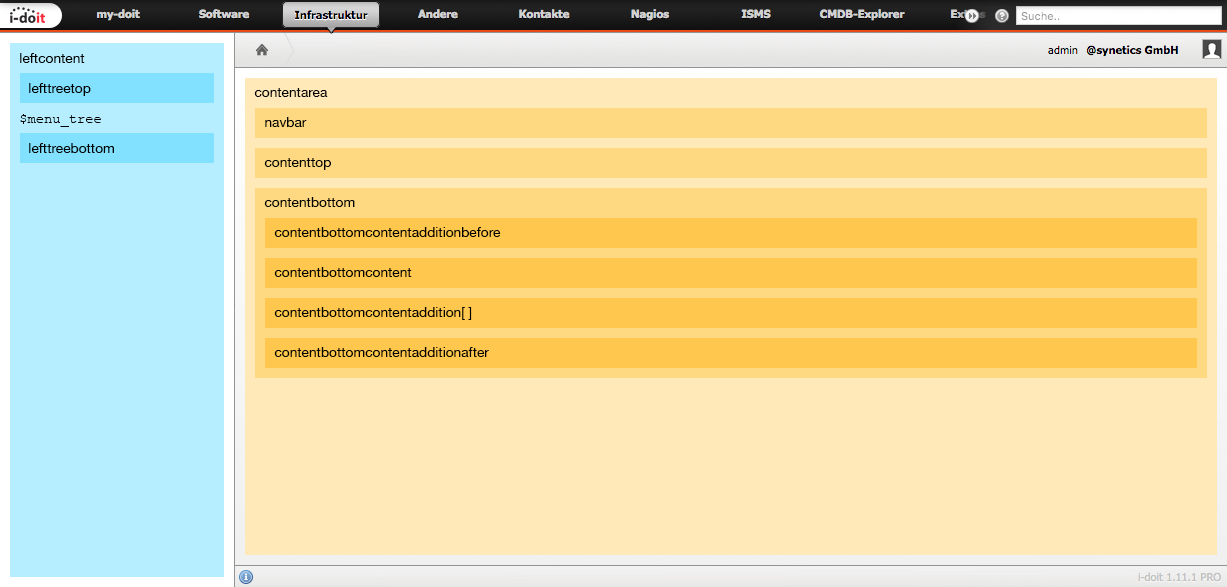
The category templates are displayed in the "contentbottomcontent" area; the associated TOM path is "tom.content.bottom.content". To pass data from the UI class to the Smarty plugins, we need to write the following lines of code:
1 2 3 4 5 6 7 8 9 10 | |
In our template, we can now use a Smarty plugin to output the value "Test" in a text field. The following syntax is required:
1 | |
If we now open our category, the template would display (depending on View / Edit mode) the text or a text field with the content "Test".
Depending on the Smarty plugin, there are a number of different parameters that can be passed to populate the respective form fields with data. In the source code, the various plugins can be found in the directory {i-doit}/src/classes/smarty. Further examples follow in the section "Smarty Plugins".
Preparing the List via process_list() (only for Multi-Value Categories)#
This method is called when a user navigates to a multi-value category. It is mainly responsible for preparing the table. Usually, this method does not need to be implemented manually -- only categories of the "Assignment" type need to do this to couple the "Add" button with an "Object Browser" instance.
This is done via $this->object_browser_as_new(...). There are a number of required parameters that are best studied from categories such as "Contact Assignment" or "Stacking".
Subsequently, parent::process_list() can be called with all parameters so that i-doit handles the rest.
Category Template#
General Structure#
The general structure described here refers to categories that should be displayed in the i-doit "look and feel". Here we only need a simple table with predefined CSS classes:
1 2 3 4 5 6 7 8 9 10 11 12 13 14 15 16 17 18 19 | |
Smarty Plugins#
Each of these plugins has a number of shared as well as specific parameters that can only be used for that particular plugin.
f_labelf_textf_textareaf_wysiwygf_passwordf_dialogf_popup
Some of the shared parameters are:
name
The name is required and is used for the "TOM" and the passed "rules" to identify the respective plugin.idorp_strID
The "id" is in most cases output in the HTML as the attribute of the same name and can then be reused in JavaScript to select elements.type
The "type" parameter ultimately determines which Smarty plugin should be used. Using the provided value, the responsible PHP class can also be identified:isys_smarty_plugin_{type}.class.php.p_strClass
Is used to write CSS classes onto the HTML elements.p_strStyle
The content of this parameter is written as a "style" attribute on the responsible HTML element.
The best resource for available parameters is the code itself, as the plugins are updated from time to time and static documentation at this point would quickly become outdated.
In some Smarty plugins, JavaScript-specific parameters are also used, such as p_onChange, p_onClick, p_onMouseOver, and p_onKeyDown, etc. -- these parameters should be avoided if possible.
These cases can only not be avoided when they are absolutely necessary and must also exist in the context of other interfaces (such as "List Editing").
Popups in i-doit#
In addition to the other form fields, i-doit also has "popups", such as the Object Browser, Dialog Plus, or the Date Picker. For these GUI elements, the same "type" is always used ("f_popup"). The respective popup must then be determined via the parameter p_strPopupType.
The core popups are located in the folder {i-doit}/src/classes/popups/ and are referenced via their types: isys_popup_{type}.class.php.
Popup classes always inherit from isys_component_popup and contain at least two methods:
handle_smarty_include
This method is called in both VIEW and EDIT mode and must return HTML that includes the actual popup trigger -- in this case, this is any HTML element that receives an "onclick" attribute whose content is generated with the help of$this->getModalJs(...). Typically, the HTML also includes a form field that contains the respective popup value.handle_smarty_request
This method is called via an Ajax request when the popup trigger is activated. It must render the popup-specific Smarty template and terminate the request withdie;. i-doit will receive the template in the frontend, embed it in the popup HTML, and display it.
Order of Data Passing#
As previously described, the UI class can ideally handle the complete processing of data and UI parameters. This means it passes both data from the DAO and the UI parameters from the attribute definition directly to the TOM.
This logic can be leveraged to focus only on the essentials in the UI class by calling $rules = parent::process(); at the beginning of the process method.
The $rules array can be supplemented (or zeroed out) as desired. At the end of the method, the $rules array should be passed to Smarty again.
The last place where parameters can be changed is directly in the template itself. Theoretically, any parameter passed via TOM can be overwritten in this way:
1 2 3 | |
While this works well in theory, it can unfortunately cause the developer some stumbling blocks in practice. Because other interfaces (such as "List Editing") will not receive the changed parameters and therefore display different results than in the category itself.
On the other hand, this knowledge can also be used deliberately to produce a different (desired) behavior in the category itself.