Automated Contract Term Renewal#
Last tested with i-doit version 23
Use case: A tenant's contract has passed the last cancellation date and needs to be renewed.
To renew the contract, we use the extend-contracts command.
Step 1: Making the Contract Compatible with extend-contracts#
For a contract to be renewed with the extend-contracts command, it must meet a few prerequisites.
To do this, we first need to edit the existing contract.
The required settings can be found in the object view of the desired contract,
Contract > Contract Information
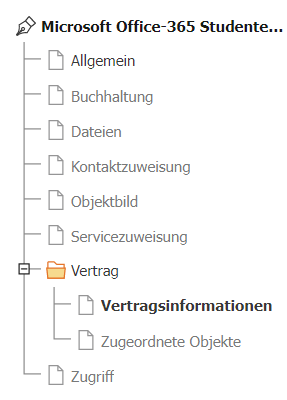
which we then edit:
- Contract term period is set to 1 Year
- Contract end by is set to Cancellation
- Cancellation date remains empty
- Cancellation period is set to 1 Month and at contract end
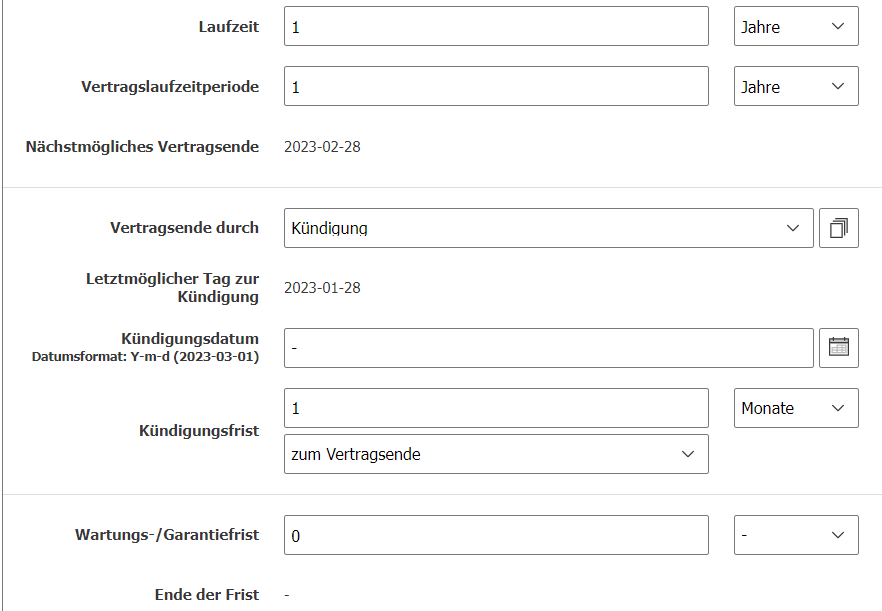
The prerequisites to execute the command are as follows:
- Contract term period must be filled in
- Contract end by must be set to Cancellation
- Cancellation date must be empty
- Cancellation period must be in the past (the same day as today does not count!)
Step 2: Applying extend-contracts#
To apply the extend-contracts command, we need to use the console.
The command is as follows:
1 | |
If the contract is configured correctly, the console will show that the contract has been extended by 1 year.

Step 3: Automating#
Since we do not want to run the command manually every day, we now create a cronjob. First, we create a new cronjob:
1 | |
We add the following code to this cronjob:
1 2 3 | |
With this code, the cronjob is executed every day at 6:15 AM and automatically renews contracts if they meet the prerequisites.
The path to the console must be specified in full, along with the username and password of the i-doit instance user.